Pre Pay As You Go Site
Darren wrote in to ask the docs if they could help with some ideas to improve the design/calls to action for his Pre-PAYG mobile site.
“I have a pay as you go focused mobile phone affiliate site, http://www.pre-pay-as-you-go.co.uk.
It went live in January this year and I have since added a blog and regularly keep both updated. I believe I have resonable skills with on and off page SEO, and have recently begun to concentrate on the latter.
My weakness I believe is design and providing visitors with an effective call to action.”
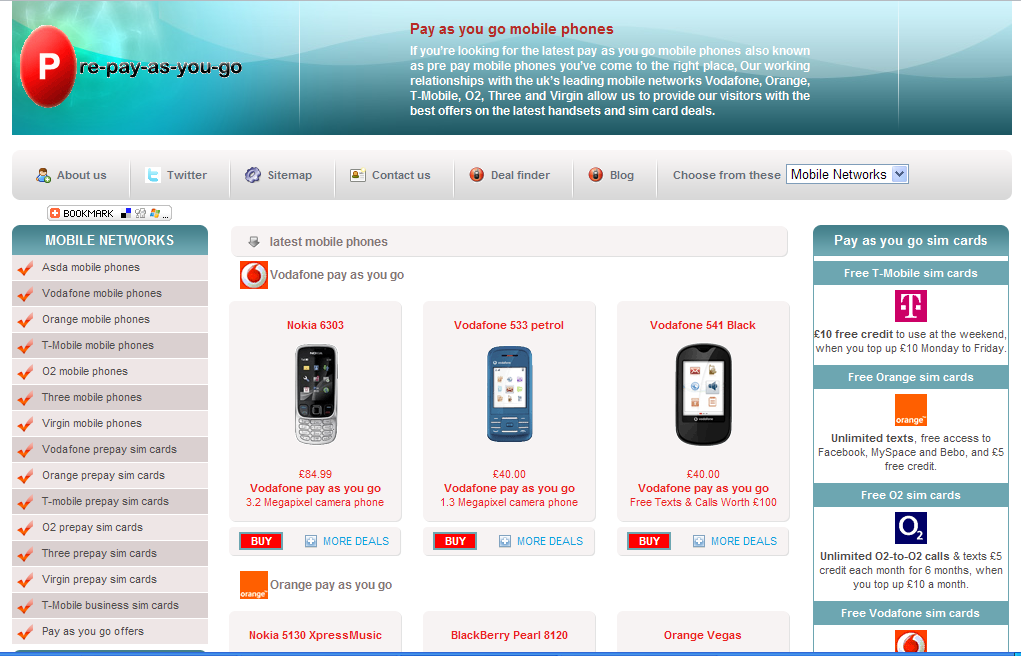
Critique:
Kier
 Hi Darren.
Generally I’m finding the site looks a bit too much like a merchant site. I tried clicking on ‘details’ to find out more about the handsets on the frontpage but it didn’t seem to work. Also, several of the links seemed to be outdated.
I’d work on adding more info about the phones and making the layout a bit less busy, have a simple categorisation system and less on the homepage overall, but with more unique content for each product. This will help your search engine rankings too.
Dan
 Hi, Darren, how are you?
I’ve assumed from what you say that you’re getting a good amount of traffic from natural search, but those visits aren’t converting into sales.
You think this is caused by your design & your call to actions. I actually think the ‘look’ of the site is pretty good, but perhaps there’s some confusion around some elements on the site that is causing you trouble.
I’ll give a few suggestions for how you could increase your conversion rate, then I’ll mention a couple of ideas on why it may currently be lower than you’d like.
QUICK SUGGESTIONS FOR IMPROVING CONVERSION
1. On each of your ‘network’ pages, put one main deal at the top. At the moment you have a grid of 6 phones, all of which look like equally sensible ‘next click’ options. That forces your visitor to try and find out about all of those 6 before choosing one to click on. Instead, give them an obvious ‘recommendation’ above your grid of 6, and give it a big ‘call to action’ button.
2. Put your best converting phones first. If the Nokia 5530 is *your* highest converting phone on T-Mobile, choose that as your ‘recommended’ phone.
3. Give less prominence to things you don’t want visitors to click on. For example, you have ‘sitemap’ & ‘twitter’ as 2 of the links in your header navigation. Do you really want a visitor to click those, rather than clicking to choose a phone?
4. Add Calls to Action where they don’t currently exist. For example, in your sidebar you have a selection of ‘Free sim card’ ads. For a visitor to get the Orange deal they have to click the Orange logo (which just looks like an image). Instead, put a ‘Get Your Free Orange SIM Card’ link underneath.
5. Do a few tests on the site, e.g. do 3 phones work better on a category page than 6? Or how about just 1? It’s not too hard to get things set up in Google Analytics to test that. Or Website Optimizer if you have a little more time.
A QUICK BREAKDOWN OF WHY SOME VISITORS MIGHT STRUGGLE WITH YOUR SITE
One thing to note is that you’ve chosen a slightly strange architecture for the site. Here’s the architecture of a ‘standard’ site in your niche:
Level 1. Homepage
Level 2. Network Page (eg. ‘T-mobile pay as you go deals’)
Level 3. Network/Manufacturer page (eg. ‘Nokia T-mobile pay as you go deals’)
Level 4. Network/Manufacturer/Handset Page (eg. ‘Nokia 7100 T-Mobile pay as you go deals’)
Here’s the architecture you’ve chosen:
Level 1. Homepage
Level 2. Network Page (with manufacturer & handset info shoehorned in via dhtml layers)
Because there are fewer levels of pages in yours, you’ve had to shoehorn a ton of extra information in using dhtml layers as a workaround. It also means you probably miss out on a lot of handset-specific search traffic. If I were you, I’d switch to the more standard site structure.
Even if you do decide to stick with your current structure, I’d try to clarify things to make the unusual bits on your site a little easier to use. Here are some examples:
1. Moving the mouse over a phone handset image displays a ‘more info’ box. But visitors would have to guess that. I’d find a way to let them know without expecting them to guess, e.g. put a ‘More Info’ link underneath the image which – when clicked – displays the more info box.
2. Your ‘Buy’ buttons send visitors straight to merchants. Again, not bad, but many won’t understand what’s happening here. You could clarify by adding a ‘We are transferring you…’ page in the redirect, or by changing it from ‘Buy’ to ‘Buy at [merchantname]’.
3. On your homepage, clicking ‘more deals’ sends the visitor to a network page. But on a network page the ‘more deals’ button does something completely different. I’d rename those to ‘More [network] deals’ and ‘More [handset] deals’ so that visitors understand what they’ll get before clicking.
SOME SIMPLE USABILITY TESTING
Whenever putting a site together, I’d suggest doing some simple usability stuff. This could be as simple as going through the site pretending to be a visitor and looking for problems. It could be getting a couple of friends to do that. Or it could be using a cheap service like www.usertesting.com to do that. If you’re interested in a usability book, “Don’t Make Me Think” by Steve Krug is a classic.
Dan









Thanks Dan & Kier for taking a look at my site.
You have definitely given me plenty of things to think about, with regards to the continued development of the site.
I agree the site needs more calls to action and the structure changing, this is something I have already begun to look into.
You mentioned that a good idea would be to direct visitors to a merchants site using redirect pages, currently I dont have a clue how to do this.
Could you direct me to a online source of information.
Again id like to thank you for taking a look, hopefully your advice and the changes I make will increase conversion from 2% to nearer 8-10%! hopefully.